
security feature in Chrome for desktops last year, Google has now
finally introduced ‘the extra line of defence’ for Android
smartphone users surfing the Internet over the Chrome web browser.
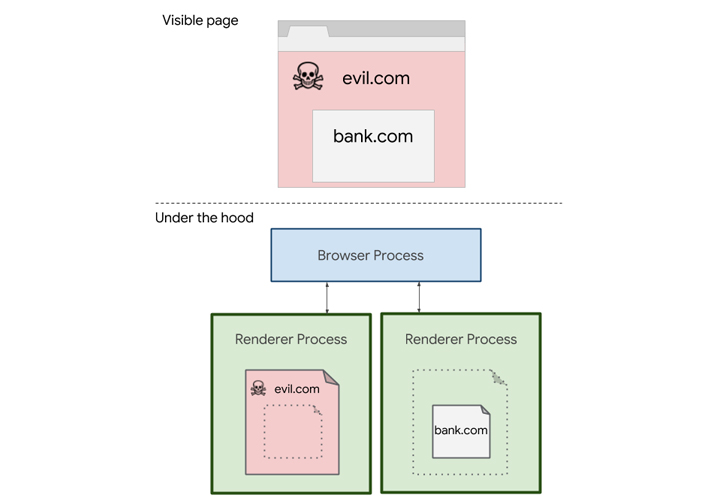
In brief, Site Isolation is a security feature that adds an
additional boundary between websites by ensuring that pages from
different sites end up in different sandboxed processes in the
browser.
Since each site in the browser gets its own isolated process, in
case of a browser flaw or Spectre like side-channel vulnerability,
the feature makes it harder for attackers or malicious websites to
access or steal cross-site data of your accounts on other
websites.
Site Isolation helps protect many types of sensitive data,
including authentication cookies, stored passwords, network data,
stored permissions, as well as cross-origin messaging that help
sites securely pass messages across domains.
experimental zone and two critical CPU
vulnerabilities were discovered, called Spectre and
Meltdown, that allowed malicious websites to launch speculative
side-channel attacks directly from the browser.
“Even if a Spectre attack were to occur in a malicious web page,
data from other websites would generally not be loaded into the
same process, and so there would be much less data available to the
attacker,” Google said. “This significantly reduces the threat
posed by Spectre.”
feature in Chrome for desktops and promised to the extent the
same for Chrome users on Android to help them defend against even
fully compromised processes.
Performance Tradeoff: Chrome for Android Only Isolates Sites
with Login
Today, the tech giant has finally announced the availability of
this feature with the release of Chrome 77 for Android, which has
now been enabled for 99% of users who are running Android devices
with a sufficient amount of RAM i.e., at least 2GB, with a 1%
holdback to monitor and improve performance.
Most importantly, it should be noted that unlike Chrome for
desktops, the site isolation feature in Chrome for Android doesn’t
sandbox all websites.
Site Isolation on Chrome 77 for Android has been re-designed to
protect only high-value websites where users log in with passwords.
“We wanted to ensure that Site Isolation does not adversely affect
user experience in a resource-constrained environment like
Android,” Google said today in its latest blog
post[6].
“This is why, unlike desktop platforms where we isolate all sites,
Chrome on Android uses a slimmer form of Site Isolation, protecting
fewer sites to keep overhead low. This protects sites with
sensitive data that users likely care about, such as banks or
shopping sites, while allowing process sharing among less critical
sites.”
Chrome browser on your Android phone and log in to your account,
Chrome will observe a password interaction and automatically turn
on the Site Isolation feature.
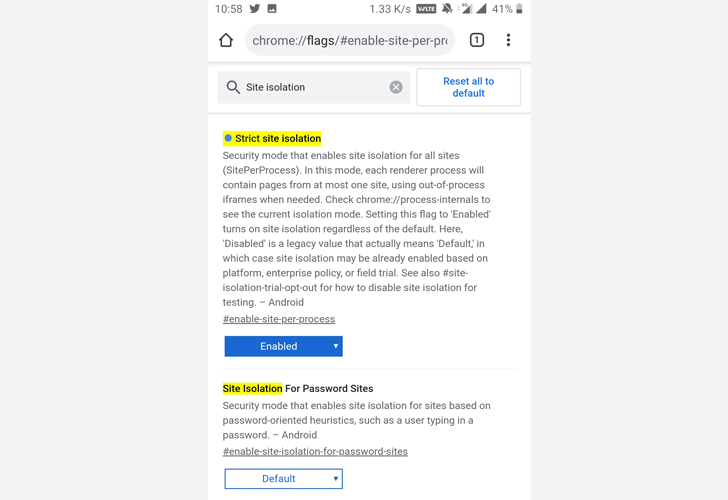
dedicated renderer process, helping protect your sensitive
information on that site from all other sites.
Moreover, Chrome will keep a list of your isolated sites stored
locally on your device, which helps the browser to automatically
turn on the feature whenever you revisit one of those sites.
However, if you want to forcefully enable this protection to
isolate all websites without caring about the performance of your
device, you can manually opt-in to full Site Isolation via
chrome://flags/#enable-site-per-process setting page.
References
- ^
Site Isolation
(thehackernews.com) - ^
two critical CPU vulnerabilities
(thehackernews.com) - ^
Spectre and Meltdown
(thehackernews.com) - ^
speculative side-channel attacks
(thehackernews.com) - ^
Site Isolation feature in Chrome
(thehackernews.com) - ^
blog post
(security.googleblog.com)
Read more http://feedproxy.google.com/~r/TheHackersNews/~3/8lX766RBqQM/chrome-site-isolation-android.html