
Cybersecurity researchers have disclosed a new executable image
tampering attack dubbed “Process Ghosting” that could be
potentially abused by an attacker to circumvent protections and
stealthily run malicious code on a Windows system.
“With this technique, an attacker can write a piece of malware
to disk in such a way that it’s difficult to scan or delete it —
and where it then executes the deleted malware as though it were a
regular file on disk,” Elastic Security researcher Gabriel Landau
said[1]. “This technique does
not involve code injection, Process Hollowing, or Transactional
NTFS (TxF).”
Process Ghosting expands on previously documented endpoint bypass[2]
methods such as Process Doppelgänging[3]
and Process Herpaderping[4], thereby enabling the
veiled execution of malicious code that may evade anti-malware
defenses and detection.
Process Doppelgänging, analogous to Process Hollowing[5], involves injecting
arbitrary code in the address space of a legitimate application’s
live process that can then be executed from the trusted service.
Process Herpaderping, first detailed last October, describes a
method to obscure the behavior of a running process by modifying
the executable on disk after the image has been mapped in
memory.
The evasion works because of “a gap between when a process is
created and when security products are notified of its creation,”
giving malware developers a window to tamper with the executable
before security products can scan it.
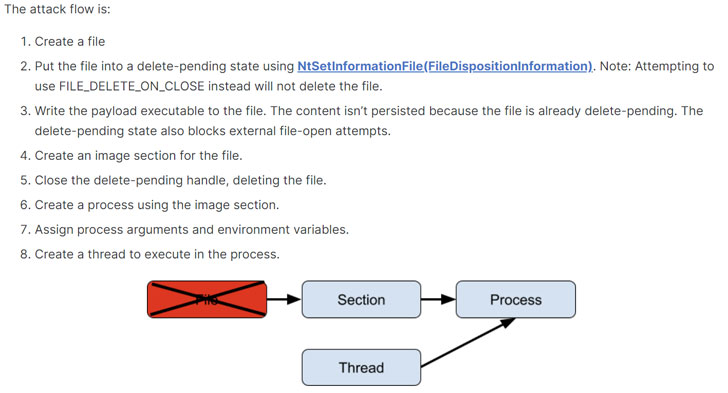
Process Ghosting goes a step further from Doppelgänging and
Herpaderping by making it possible to run executables that have
already been deleted. It takes advantage of the fact that Windows’
attempts to prevent mapped executables from being modified or
deleted only come into effect after the binary is mapped
into an image section.
“This means that it is possible to create a file, mark it for
deletion, map it to an image section, close the file handle to
complete the deletion, then create a process from the now-fileless
section,” Landau explained. “This is Process Ghosting.”
In a proof-of-concept (PoC) demo, the researchers detailed a
scenario wherein Windows Defender attempts to open a malicious
payload executable to scan it, but fails to do so because the file
is in a delete-pending state, and then fails again as the file is
already deleted, thus allowing it to be executed unimpeded.
Elastic Security said it reported the issue to Microsoft
Security Response Center (MSRC) in May 2021, following which the
Windows maker said the issue “does not meet their bar for
servicing[6],” echoing a similar
response when Process Herpaderping was responsibly disclosed to
MSRC in July 2020.
Microsoft, for its part, has since released an updated version
of its Sysinternals[7]
Suite earlier this January with an improved System Monitor[8]
(aka Sysmon) utility to help detect Process Herpaderping and
Process Hollowing attacks.
As a result, Sysmon[9]
versions 13.00 (and later) can now generate and log “Event ID 25[10]” when a piece of
malware tampers with a legitimate process and if a process image is
changed from a different process, with Microsoft noting[11] that the event is
triggered “when the mapped image of a process doesn’t match the
on-disk image file, or the image file is locked for exclusive
access.”
References
- ^
said
(www.elastic.co) - ^
endpoint
bypass (www.mcafee.com) - ^
Process
Doppelgänging (thehackernews.com) - ^
Process
Herpaderping (www.crowdstrike.com) - ^
Process
Hollowing (attack.mitre.org) - ^
does not
meet their bar for servicing
(www.microsoft.com) - ^
Sysinternals
(docs.microsoft.com) - ^
improved
System Monitor (medium.com) - ^
Sysmon
(docs.microsoft.com) - ^
Event
ID 25 (docs.microsoft.com) - ^
noting
(techcommunity.microsoft.com)