

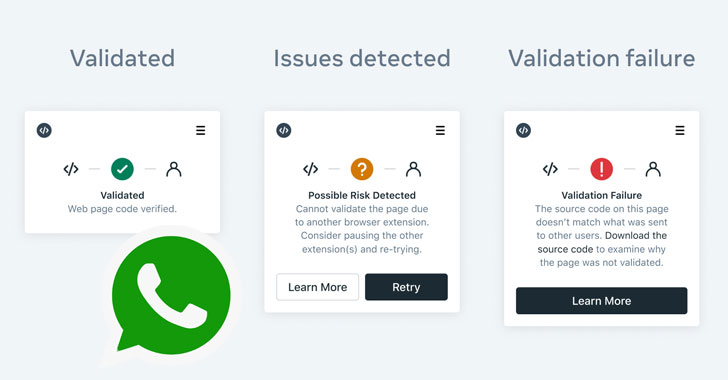
Meta Platforms’ WhatsApp and Cloudflare have banded together for
a new initiative called Code Verify to validate the
authenticity of the messaging service’s web app on desktop
computers.
Available in the form of a Chrome and Edge browser extension[1], the open-source add-on[2]
is designed to “automatically verif[y] the authenticity of the
WhatsApp Web code being served to your browser,” Facebook said[3]
in a statement.
The goal with Code Verify is to confirm the integrity of the web
application and ensure that it hasn’t been tampered with to inject
malicious code. The social media company is also planning to
release a Firefox plugin to achieve the same level of security
across browsers.
The system works with Cloudflare acting as a third-party audit
to compare the cryptographic hash of WhatsApp Web’s JavaScript code
that’s shared by Meta with that of a locally computed hash of the
code running on the browser client.
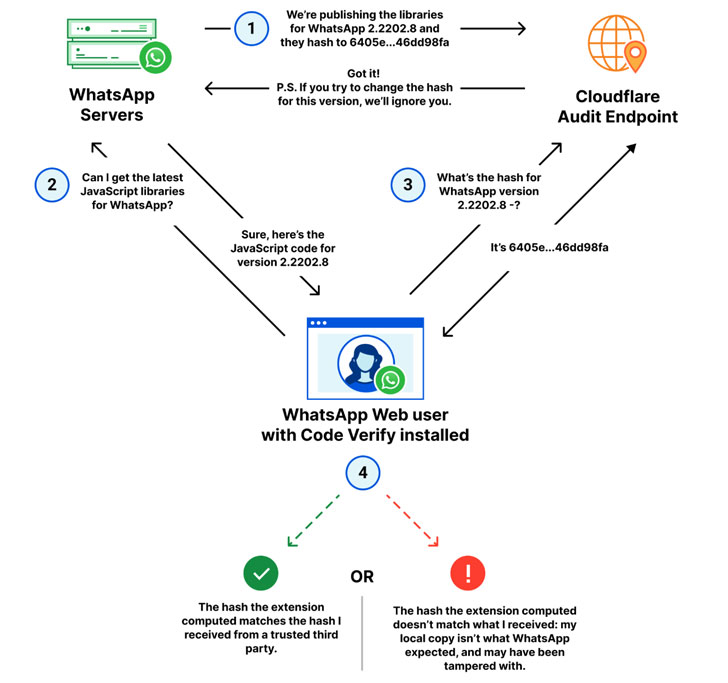
Code Verify is also meant to be flexible in that whenever the
code for WhatsApp Web is updated, the cryptographic hash value will
be updated automatically in tandem, so that the code served to
users is certified on the fly.
WhatsApp, in a separate FAQ[4]
on the latest security feature, emphasized that “the extension
won’t read or access the messages you send or receive, and we won’t
know if you have downloaded the extension.” The add-on will also
not log any data, metadata, or user data, and doesn’t share any
information with WhatsApp, it noted.
“The idea itself — comparing hashes to detect tampering or even
corrupted files — isn’t new, but automating it, deploying it at
scale, and making sure it ‘just works’ for WhatsApp users is,”
Cloudflare said[5].
References
- ^
browser
extension (chrome.google.com) - ^
open-source add-on
(github.com) - ^
said
(engineering.fb.com) - ^
separate
FAQ (faq.whatsapp.com) - ^
said
(blog.cloudflare.com)
Read more https://thehackernews.com/2022/03/heres-how-to-find-if-whatsapp-web-code.html