Microsoft on Monday announced the general availability of a
feature called Autopatch that automatically keeps Windows
and Office software up-to-date on enrolled endpoints.
The launch, which comes a day before Microsoft is expected to
release its monthly round of security patches, is available for
customers with Windows Enterprise E3 and E5 licenses. It, however,
doesn’t support Windows Education (A3) or Windows Front Line Worker
(F3) licenses.
“Microsoft will continue to release updates on the second
Tuesday of every month and now Autopatch helps streamline updating
operations and create new opportunities for IT pros,” Lior Bela
said[1].
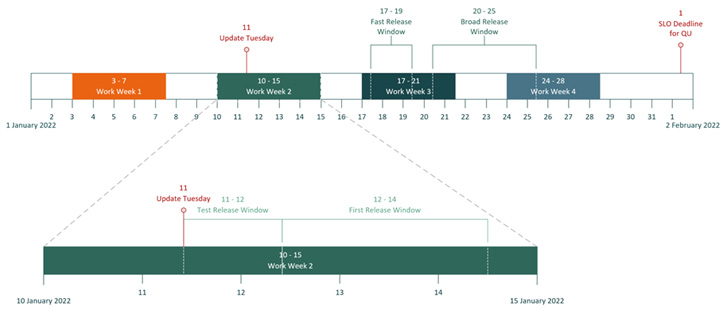
Autopatch works by applying security updates[2] first to devices in
what’s called the Test ring, which contains a minimum number of
representative devices. After a validation period, the updates are
pushed to the First (1% devices), Fast (9%), and Broad (90%)
rings.
The service was first teased[3]
by the tech giant in April 2022 in an attempt to apply Patch
Tuesday updates in a timely fashion and prevent potential attack
vectors.
Besides Windows 10 and 11 updates, Autopatch also covers
Microsoft Edge and Microsoft 365 software, while enabling
organizations to create testing rings, monitor updates, and even
pause and roll back changes in the event any issues are
encountered.
On top of that, the service incorporates provisions for an
expedited release cadence should a threat be deemed critical (e.g.,
a zero-day flaw).
“Windows Autopatch aims to keep at least 95% of eligible devices
on the latest Windows quality update 21 days after release,” the
company notes[4]
in its documentation.
“When running an expedited release, the regular goal […] no
longer applies. Instead, Windows Autopatch greatly accelerates the
release schedule of the release to update the environment more
quickly.”
References
Read more https://thehackernews.com/2022/07/microsoft-windows-autopatch-is-now.html