
Unsurprisingly, here at Rewind[1], we’ve got a lot of data
to protect (over 2 petabytes worth). One of the databases we use is
called Elasticsearch (ES or Opensearch, as it is currently known in
AWS). To put it simply, ES is a document database that facilitates
lightning-fast search results. Speed is essential when customers
are looking for a particular file or item that they need to restore
using Rewind[2]. Every second of
downtime counts, so our search results need to be fast, accurate,
and reliable.
Another consideration was disaster recovery[3]. As part of our System and
Organization Controls Level 2 (SOC2)[4]
certification process, we needed to ensure we had a working
disaster recovery plan to restore service in the unlikely event
that the entire AWS region was down.
“An entire AWS region?? That will never happen!” (Except for
when it did[5])
Anything is possible, things go wrong, and in order to meet our
SOC2 requirements we needed to have a working solution.
Specifically, what we needed was a way to replicate our customer’s
data securely, efficiently, and in a cost-effective manner to an
alternate AWS region. The answer was to do what Rewind does so well
– take a backup!
Let’s dive into how Elasticsearch works, how we used it to
securely backup data, and our current disaster recovery
process.
Snapshots
First, we’ll need a quick vocabulary lesson. Backups in ES are
called snapshots. Snapshots are stored in a snapshot
repository. There are multiple types of snapshot
repositories[6], including one backed by
AWS S3. Since S3 has the ability to replicate its contents to a
bucket in another region, it was a perfect solution for this
particular problem.
AWS ES comes with an automated snapshot repository pre-enabled
for you. The repository is configured by default to take hourly
snapshots and you cannot change anything about it. This was a
problem for us because we wanted a daily snapshot sent to
a repository backed by one of our own S3 buckets, which was
configured to replicate its contents to another region.
 |
| List of automated snapshots GET _cat/snapshots/cs-automated-enc?v&s=id |
Our only choice was to create and manage our own snapshot
repository and snapshots.
Maintaining our own snapshot repository wasn’t ideal, and
sounded like a lot of unnecessary work. We didn’t want to reinvent
the wheel, so we searched for an existing tool that would do the
heavy lifting for us.
Snapshot Lifecycle Management (SLM)
The first tool we tried was Elastic’s Snapshot lifecycle management
(SLM)[7], a feature which is
described as:
The easiest way to regularly back up a cluster. An SLM
policy automatically takes snapshots on a preset schedule. The
policy can also delete snapshots based on retention rules you
define.
You can even use your own snapshot repository too. However, as
soon as we tried to set this up in our domains it failed. We
quickly learned that AWS ES is a modified version of Elastic. co’s
ES and that SLM was not supported in AWS ES.
Curator
The next tool we investigated is called Elasticsearch
Curator[8]. It was open-source and
maintained by Elastic.co themselves.
Curator is simply a Python tool that helps you manage your
indices and snapshots. It even has helper methods for creating
custom snapshot repositories which was an added bonus.
We decided to run Curator as a Lambda function driven by a
scheduled EventBridge rule, all packaged in AWS SAM.
Here is what the final solution looks like:
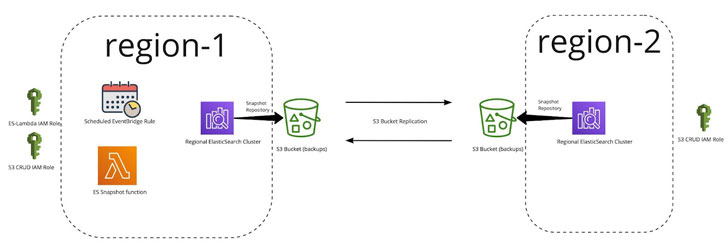
ES Snapshot Lambda Function
The Lambda uses the Curator tool and is responsible for snapshot
and repository management. Here’s a diagram of the logic:
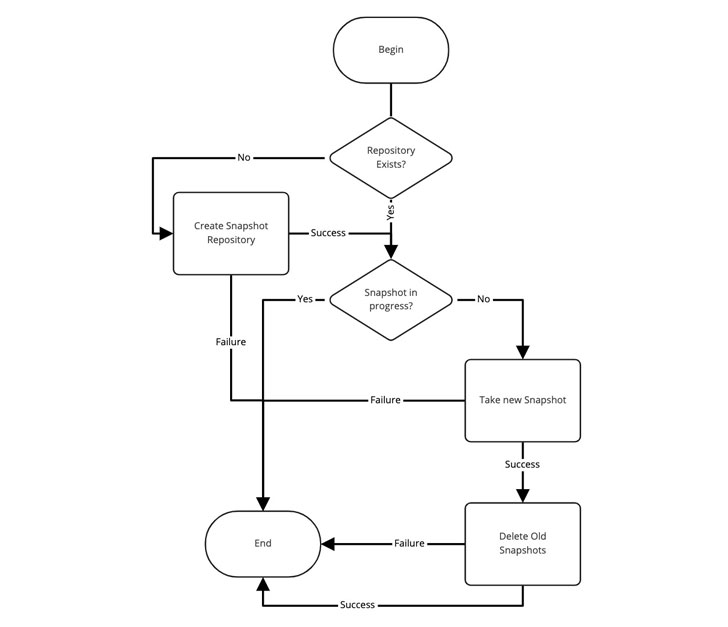
As you can see above, it’s a very simple solution. But, in order
for it to work, we needed a couple things to exist:
- IAM roles to grant permissions
- An S3 bucket with replication to another region
- An Elasticsearch domain with indexes
IAM Roles
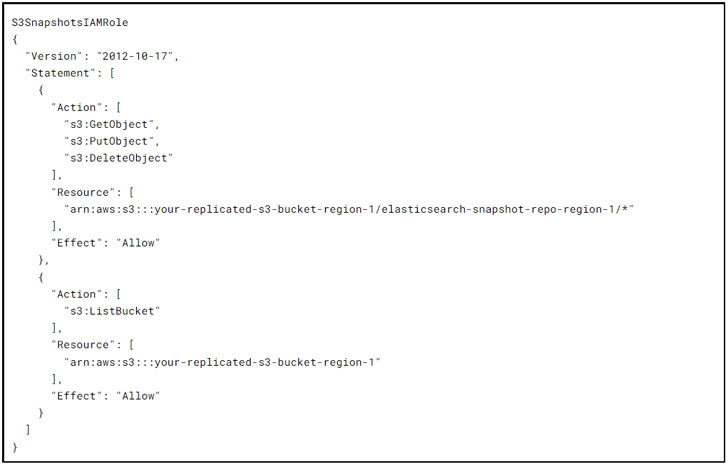
The S3SnapshotsIAMRole grants curator the permissions
needed for the creation of the snapshot repository and the
management of actual snapshots themselves:
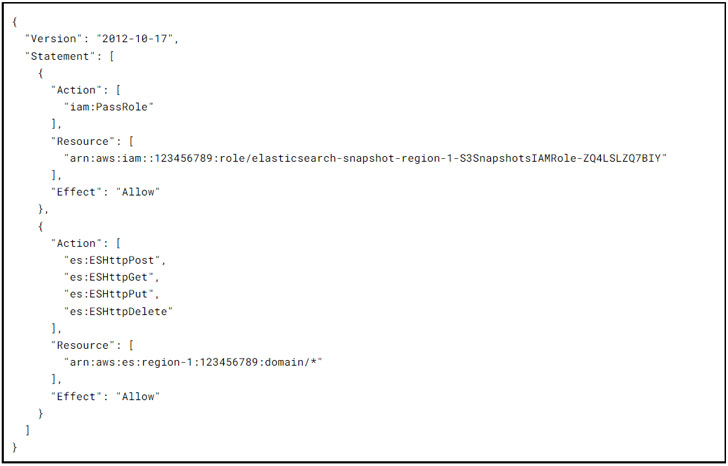
The EsSnapshotIAMRole grants Lambda the permissions
needed by curator to interact with the Elasticsearch domain:
Replicated S3 Buckets
The team had previously set up replicated S3 buckets for other
services in order to facilitate cross region replication in
Terraform. (More info on that here[9])
With everything in place, the cloudformation stack deployed in
production initial testing went well and we were done…or were
we?

Backup and Restore-a-thon I
Part of SOC2 certification requires that you validate your
production database backups for all critical services. Because we
like to have some fun, we decided to hold a quarterly “Backup and
Restore-a-thon”. We would assume the original region was gone and
that we had to restore each database from our cross regional
replica and validate the contents.
One might think “Oh my, that is a lot of unnecessary work!” and
you would be half right. It is a lot of work, but it is absolutely
necessary! In each Restore-a-thon we have uncovered at least one
issue with services not having backups enabled, not knowing how to
restore, or access the restored backup. Not to mention the hands-on
training and experience team members gain actually doing something
not under the high pressure of a real outage. Like running a fire
drill, our quarterly Restore-a-thons help keep our team prepped and
ready to handle any emergency.
The first ES Restore-a-thon took place months after the feature
was complete and deployed in production so there were many
snapshots taken and many old ones deleted. We configured the tool
to keep 5 days worth of snapshots and delete everything else.
Any attempts to restore a replicated snapshot from our
repository failed with an unknown error and not much else to go
on.
Snapshots in ES are incremental meaning the higher the frequency
of snapshots the faster they complete and the smaller they are in
size. The initial snapshot for our largest domain took over 1.5
hours to complete and all subsequent daily snapshots took
minutes!
This observation led us to try and protect the initial snapshot
and prevent it from being deleted by using a name suffix (-initial)
for the very first snapshot taken after repository creation. That
initial snapshot name is then excluded from the snapshot deletion
process by Curator using a regex filter.
We purged the S3 buckets, snapshots, and repositories and
started again. After waiting a couple of weeks for snapshots to
accumulate, the restore failed again with the same cryptic error.
However, this time we noticed the initial snapshot (that we
protected) was also missing!
With no cycles left to spend on the issue, we had to park it to
work on other cool and awesome things that we work on here at
Rewind[10].
Backup and Restore-a-thon II
Before you know it, the next quarter starts and it is time for
another Backup and Restore-a-thon and we realize that this is still
a gap in our disaster recovery plan. We need to be able to restore
the ES data in another region successfully.
We decided to add extra logging to the Lambda and check the
execution logs daily. Days 1 to 6 are working perfectly fine –
restores work, we can list out all the snapshots, and the initial
one is still there. On the 7th day something strange happened – the
call to list the available snapshots returned a “not found” error
for only the initial snapshot. What external force is deleting our
snapshots??
We decided to take a closer look at the S3 bucket contents and
see that it is all UUIDs (Universally Unique Identifier) with some
objects correlating back snapshots except for the initial snapshot
which was missing.
We noticed the “show versions” toggle switch in the console and
thought it was odd that the bucket had versioning enabled on it. We
enabled the version toggle and immediately saw “Delete Markers” all
over the place including one on the initial snapshot that corrupted
the entire snapshot set.
Before & After
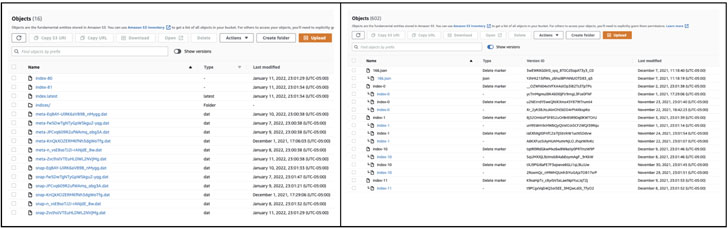
We very quickly realized that the S3 bucket we were using had a
7 day lifecycle rule that purged all objects older than 7 days.
The lifecycle rule exists so that unmanaged objects in the
buckets are automatically purged in order to keep costs down and
the bucket tidy.

We restored the deleted object and voila, the listing of
snapshots worked fine. Most importantly, the restore was a
success.
The Home Stretch
In our case, Curator must manage the snapshot lifecycle so all
we needed to do was prevent the lifecycle rule from removing
anything in our snapshot repositories using a scoped path filter on
the rule.
We created a specific S3 prefix called “/auto-purge” that the
rule was scoped to. Everything older than 7 days in /auto-purge
would be deleted and everything else in the bucket would be left
alone.
We cleaned up everything once again, waited > 7 days, re-ran
the restore using the replicated snapshots, and finally it worked
flawlessly – Backup and Restore-a-thon finally completed!

Conclusion
Coming up with a disaster recovery plan is a tough mental
exercise. Implementing and testing each part of it is even harder,
however it’s an essential business practice that ensures your
organization will be able to weather any storm. Sure, a house fire
is an unlikely occurrence, but if it does happen, you’ll probably
be glad you practiced what to do before smoke starts billowing.
Ensuring business continuity in the event of a provider outage
for the critical parts of your infrastructure presents new
challenges but it also provides amazing opportunities to explore
solutions like the one presented here. Hopefully, our little
adventure here helps you avoid the pitfalls we faced in coming up
with your own Elasticsearch disaster recovery plan.
Note — This article is written and contributed by
Mandeep Khinda, DevOps Specialist at Rewind.
References
- ^
Rewind
(rewind.com) - ^
Rewind
(rewind.com) - ^
recovery
(rewind.com) - ^
System
and Organization Controls Level 2 (SOC2)
(rewind.com) - ^
when it
did (aws.amazon.com) - ^
multiple
types of snapshot repositories
(www.elastic.co) - ^
Snapshot
lifecycle management (SLM) (www.elastic.co) - ^
Elasticsearch Curator
(github.com) - ^
here
(docs.aws.amazon.com) - ^
Rewind
(rewind.com)
Read more https://thehackernews.com/2022/04/cross-regional-disaster-recovery-with.html