Password security has long been an issue for businesses and
their cybersecurity standards. Account passwords are often the
weakest link in the overall security posture for many
organizations.
Many companies have used Microsoft’s default password policies
for decades. While these can be customized, businesses often accept
the default values for their organization.
The Windows default password policy is a good start, but are
there security vulnerabilities associated with it? Let’s look at
the current recommendations from leading cybersecurity authorities
and see how they measure up against the Windows default password
policy.
Windows default password policy settings
Many, if not most, business environments today use Microsoft
Active Directory as their identity and access management solution
in the enterprise. Active Directory has served organizations in
this capacity for decades.
One of the built-in capabilities provided by Microsoft Active
Directory Domain Services (ADDS) is the built-in capability to
provide password policy for an organization.
What is a password policy? A password policy provides
the set of required password characteristics that end-users must
meet when choosing their account password. Below is a look at
Active Directory Default Domain Policy Password Policy
configuration with typical values that many organizations may
use.
A newly promoted Windows Server 2019 Domain Controller
Default Domain Group Policy shows the default settings for
Password Policy.
 |
| Default Windows Password Policy settings defined in Default Domain Group Policy |
As you can see, specific policy settings are configured for you
by default. These include:
- Enforce password history – 24 passwords
remembered - Maximum password age – 42 days
- Minimum password age – 1 day
- Minimum password length – 7 characters
- Password must meet complexity requirements –
Enabled - Store passwords using reversible encryption –
Disabled
How do these defaults hold up with the current recommendations
from leading cybersecurity authorities regarding password
recommendations?
Are Windows default password policy settings insecure?
There have been changes and strong recommendations made in
recent years regarding password security that represent a shift in
password security recommendations. Industry cybersecurity experts
are emphasizing the need to check passwords against known weak
password lists (dictionaries) and are placing less focus on
password expiration policies that have long been a part of
enterprise password policies.
The National Institute of Standards and Technology
(NIST) released the NIST Special Publication 800-63B
(Digital Identity Guidelines – Authentication
and Lifecycle Management[1]).
In Section 5.1.1, ‘Memorized Secrets,’ they note this specific
guidance in regards to comparing passwords with known passwords
from a dictionary or breach list:
“When processing requests to establish and change memorized
secrets, verifiers SHALL compare the prospective secrets against a
list that contains values known to be commonly-used, expected, or
compromised. For example, the list MAY include, but is not limited
to:
- Passwords obtained from previous breach corpuses.
- Dictionary words.
- Repetitive or sequential characters (e.g. ‘aaaaaa’,
‘1234abcd’). - Context-specific words, such as the name of the service,
the username, and derivatives - thereof.”
Another section of the NIST guidance to note regarding
obligatory password changes on periodic intervals:
“Verifiers SHOULD NOT require memorized secrets to be
changed arbitrarily (e.g., periodically). However, verifiers SHALL
force a change if there is evidence of compromise of the
authenticator.”
The NIST guidance in regards to periodic password changes is now
passively recommended by Microsoft. In the Security baseline (DRAFT) for Windows 10
v1903 and Windows Server v1903[2], Microsoft notes the
following regarding enforced periodic password changes:
“Recent scientific research calls into question the value of
many long-standing password-security practices such as password
expiration policies, and points instead to better alternatives such
as enforcing banned-password lists (a great example being Azure AD
password protection) and multi-factor authentication. While we
recommend these alternatives, they cannot be expressed or enforced
with our recommended security configuration baselines, which are
built on Windows’ built-in Group Policy settings and cannot include
customer-specific values.”
Microsoft’s guidance helps to point out a flaw with the built-in
Active Directory Group Policy capabilities. There are no built-in
means to enforce banned-passwords easily. While Microsoft does
document the process to register a password filter .dll in its
guide here[3], organizations must
write their own custom password filter .dlls. This process can
entail its own set of challenges.
Looking at the other Group Policy Password Policy defaults
enabled, the 7-character minimum password length falls short of
what is noted by many leading cybersecurity best practices and
recommendations from leading authorities.
Note below the specific password policy standard minimum
password length and if they recommend comparing passwords with a
dictionary list.
- SANS Institute (admins) – 12 characters,
dictionary - NIST – 8 characters, dictionary
- NCSC – dictionary
- Microsoft Technet – 14 characters
- Microsoft Research – 8 characters,
dictionary
How can organizations easily audit their current password
policies in their environment and ensure these meet the recommended
password security best practices? How can banned password lists be
easily implemented in Active Directory environments without this
built-in capability?
Specops Password Auditor and Password Policy
Both the Specops Password Auditor[4] (Free) and Specops Password Policy[5]
from Specops Software provide extremely robust tools that can help
organizations audit their current password policies and quickly
implement breached password protection and custom dictionaries.
Organizations can implement this functionality without the need
to program and develop a custom password filter .dll.
Specops Password Auditor provides an easy way to gain visibility
to password security risks in your environment quickly. Notably,
this includes accounts with blank passwords[6], passwords set not to
expire, breached passwords[7], stale admin accounts,
and many others. One of the features it provides is the ability to
audit your password policies.
Below, the Specops Password Auditor allows you to quickly and
easily audit your current domain password policies and compare them
against leading industry-standard password policy
recommendations.
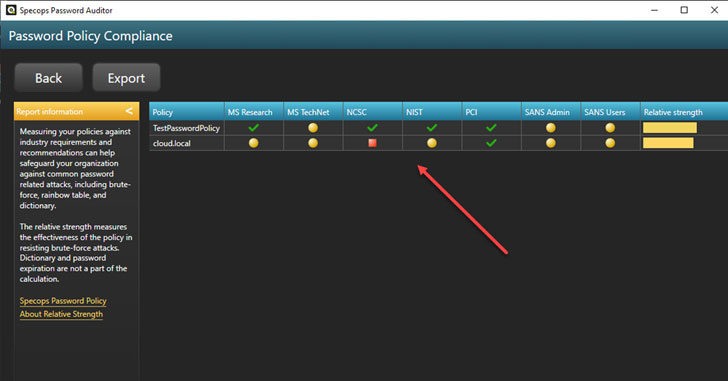 |
| Comparing Active Directory Domain Policy with industry best practice recommendations for passwords |
You can drill into each recommendation and see which specific
requirement is not met by your current Active Directory password
policy.
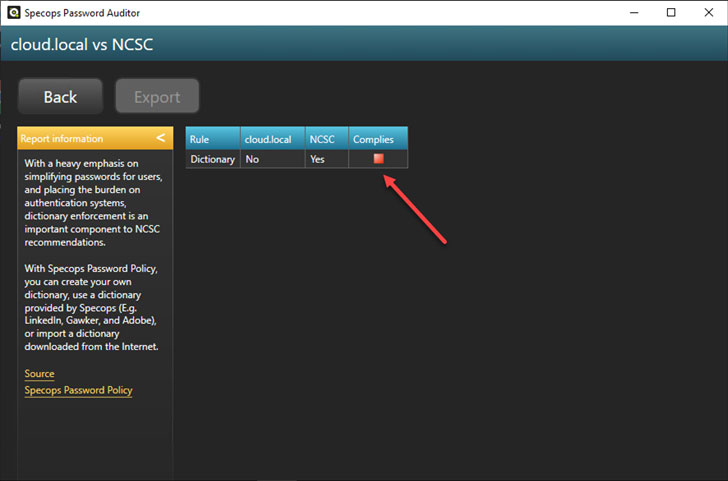 |
| Viewing password policy settings compared to specific industry best practices |
In addition to the visibility and features provided by Specops
Password Auditor, Specops Password Policy provides an effortless
way to implement banned-password lists in your Active
Directory environment[8]. It also takes this a
step further by allowing you to implement breached password
protection.
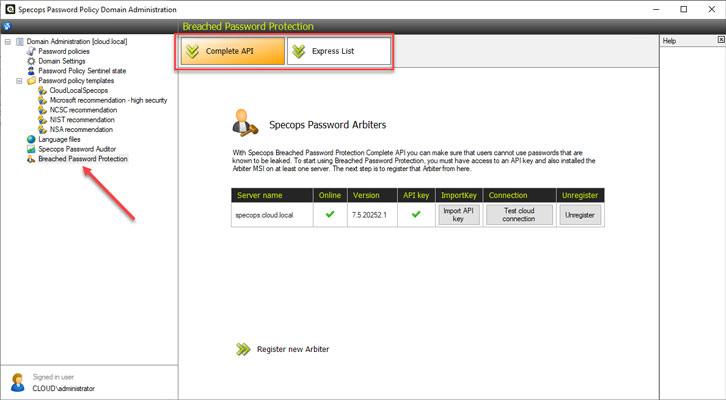 |
| Specops Password Policy breached password protection |
You can also force users to change passwords if their password
becomes breached.
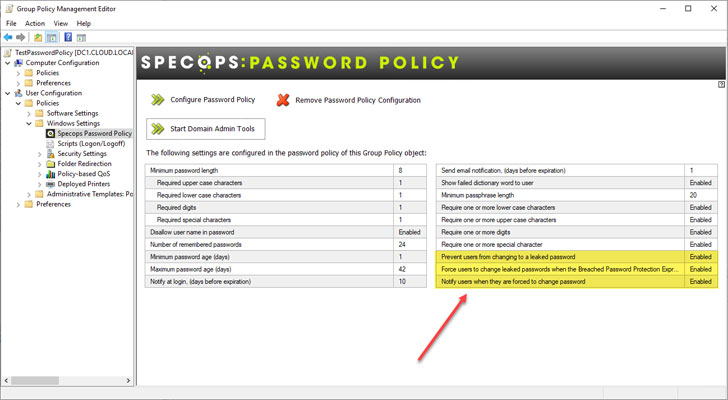 |
| Force a password change if an end-user password becomes breached |
The breached and banned-password list functionality provided by
Specops Password Policy extends the Windows default password
policy. Hence, organizations have a much more robust and secure
password policy for their environment.
Wrapping Up
Password security is crucial for the effective overall security
of your business-critical data. Hackers are commonly using
credential theft as an easy way into your IT infrastructure.
Microsoft Active Directory Domain Services (ADDS) is a widely
used solution in most enterprise environments for identity and
access management. It also handles the enforcement of password
policy for many.
The Windows default password policy as configured and enforced
by Active Directory falls short in many areas. Notably, it lacks
any built-in ability to check passwords against custom dictionary
lists or breached password lists.
Specops Password Auditor and Password Policy helps businesses
quickly gain visibility to password risks in the environment and
easily add banned-passwords and breached password list
protection.
References
- ^
Digital
Identity Guidelines – Authentication and Lifecycle Management
(nvlpubs.nist.gov) - ^
Security
baseline (DRAFT) for Windows 10 v1903 and Windows Server v1903
(docs.microsoft.com) - ^
guide
here (docs.microsoft.com) - ^
Specops
Password Auditor (specopssoft.com) - ^
Specops
Password Policy (specopssoft.com) - ^
blank
passwords (specopssoft.com) - ^
breached
passwords (specopssoft.com) - ^
banned-password lists in your Active
Directory environment (specopssoft.com) - ^
Download
Specops Password Auditor (specopssoft.com)
Read more http://feedproxy.google.com/~r/TheHackersNews/~3/fRiSRVzlfWQ/fixing-weakest-link-passwords-in.html