
Although organizations commonly go to great lengths to address
security vulnerabilities that may exist within their IT
infrastructure, an organization’s helpdesk might pose a bigger
threat due to social engineering attacks.
Social engineering is “the art of manipulating people so they
give up confidential information,” according to Webroot[1]. There are many
different types of social engineering schemes but one is area of
vulnerability is how social engineering might be used against a
helpdesk technician to steal a user’s credentials.
The Process of Gaining Access With Social Engineering
The first step in such an attack is usually for the attacker to
gather information about the organization that they are targeting.
The attacker might start by using information that is freely
available on the Internet to figure out who within the organization
is most likely to have elevated permissions or access to sensitive
information. An attacker can often get this information through a
simple Google search or by querying business-oriented social
networks such as LinkedIn.
Once an attacker identifies a user whose credentials they want
to steal, they need to know the user’s login name. There are any
number of ways that an attacker could figure out a login name. One
method might simply be to try to authenticate into the
organization’s Active Directory environment. Some older Active
Directory clients will tell you if you have entered a bad username
or an incorrect password.
An easier method is for the attacker to query online databases
of leaked credentials. The attacker doesn’t necessarily need to
locate the credentials for the account that they are attacking.
They need only to find credentials for someone at that
organization. That will reveal the username structure that the
organization uses. For example, the organization might create
usernames based on firstname.lastname or perhaps a first initial
followed by a last name.
With such information in hand, the attacker might make a phone
call to the organization’s helpdesk and request a password reset.
The goal behind this phone call isn’t to get the password reset,
but rather to find out what types of protocols the organization has
in place. For example, the helpdesk technician might ask the
attacker (who is posing as a legitimate employee) a security
question such as, “what is your employee ID number”. The attacker
can then tell the technician that they don’t have their employee ID
number handy and will call back later when they have it in front of
them.
At this point, the attacker has several crucial pieces of
information in their possession. They know the victim’s name, the
victim’s login name, and the security question that the helpdesk
technician is going ask prior to granting a password reset.
Combatting Social Engineering Attack With Security
Questions
Unfortunately, security questions are largely ineffective. An
experienced attacker can easily acquire the answers to security
questions from any number of different sources. The Dark Web for
instance, contains entire databases of answers to potential
security questions and we know end-users often divulge way too much
personal information on social media.
In addition to security questions, some organizations have
historically used caller ID information as a tool for verifying a
user’s identity. However, this method is also unreliable because
cloud-based PBX systems make it simple for an attacker to spoof
caller ID information.
The important thing to remember is that social engineering
attacks are not theoretical attack vectors, they happen in the real
world. Earlier this year, Electronic Arts was infiltrated by
hackers[2] who stole a large amount
of data (including source code for the company’s FIFA 21 soccer
game). The hacker gained access by tricking the company’s IT
support staff into giving them access to the company’s network.
So, if security questions and other conventional identity
verification mechanisms are no longer effective, how can an
organization defend itself against this sort of attack?
Onus on the Helpdesk Technician
The key to preventing social engineering attacks against the
helpdesk is to make it impossible for a helpdesk technician to
knowingly or unknowingly aid in such an attack. The technician is,
for all practical purposes, the weak link in the security
chain.
Consider the earlier example in which an attacker contacts an
organization’s helpdesk pretending to be an employee who needs
their password reset. Several things could conceivably happen
during that conversation. Some possible outcomes include:
- The attacker answers the security question using stollen
information sourced from social media or from the Dark Web - The attacker tries to gain the technician’s trust through
friendly conversation to gain favor with the technician. The
attacker hopes that the technician will overlook the rules and go
ahead and reset the password, even in the absence of the required
security information. In some situations, the attacker might also
try to make the helpdesk technician feel sorry for them. - The attacker might try to intimidate the helpdesk technician by
posing as a CEO who is extremely upset that they cannot log in.
When the helpdesk technician asks a security question, the attacker
might scream that they do not have time to answer a bunch of stupid
questions, and demand that the password be reset right now (this
technique has succeeded many times in the real world).
Ultimately, the technician’s discretion is the only thing that
determines whether the requested password reset is going to happen.
There is nothing within the native Active Directory tools that will
stop a technician from being able to reset a user’s password if the
technician fails to prove the user’s identity adequately. As such,
the Active Directory tools can be thought of as another weak link
in the security chain.
The Secure Solution to Socially Engineered Cyber Attack
The best way to eliminate the possibility that the organization
will be breached by these types of attacks is to prevent the
helpdesk staff from using the Active Directory Users and Computers
console or similar tools for password resets. Instead, it is better
to use a third-party solution such as Specops Secure Service Desk[3], that will physically
prevent a technician from resetting a password unless certain MFA
requirements have been satisfied.
To see how the Secure Service Desk eliminates the risks
associated with password resets, consider a situation in which a
legitimate user requests a password reset. The helpdesk technician
can send a six-digit code to the user’s mobile device (which has
been preregistered and is known to belong to the user). The
technician cannot see this code and does not know what code was
sent. When the user receives the code, they must read it to the
technician, who then enters the code into the Specops software.
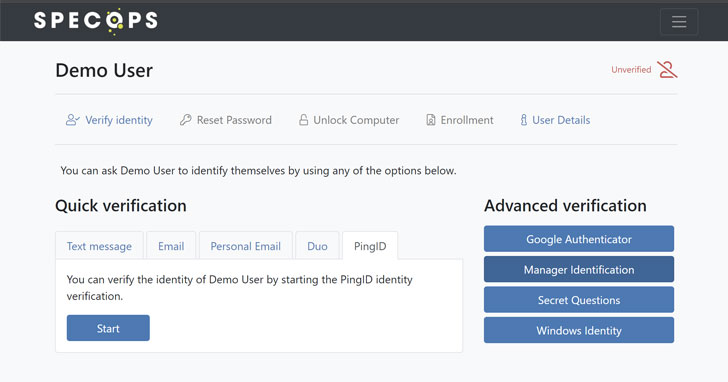 |
| The admin view of an active helpdesk user verification using Specops Secure Service Desk |
Only then is the technician allowed to reset the user’s
password. This makes it impossible for the technician to skirt the
rules and grant a password reset to someone who has failed to meet
the security requirements.
Test out Specops Secure Service
Desk[4] in your AD environment
for free to see how it works.
References
- ^
Webroot
(www.google.com) - ^
Electronic Arts was infiltrated by
hackers (www.google.com) - ^
Specops
Secure Service Desk (www.google.com) - ^
Test out
Specops Secure Service Desk
(www.google.com)